The ED roster, finally on every phone.
Book shifts, swap them, take leave and see your fair share, from the phone in your pocket. Hosted in Australia.
In daily use at a Victorian emergency department since June 2026.
Taking on new departments across Australia.
See it work
Your next shift, at a glance.
Open the app and the answer is there: when you're on next, and how many shifts you've booked this cycle.
Tap a day. See what's open and why.
Every zone says Open, or who has it, or which rule is holding it. No guessing.
Pick. The first tap wins.
Tap a zone marked Open and the shift is yours at once, checked against the live roster as you tap. First tap gets the slot; you're told at once if a colleague got there first. A group that prefers a basket and a Confirm step can switch one on.
Swaps, leave and open shifts come to you.
A colleague's swap offer, your leave decision and an open shift arrive as things you can act on, not messages to chase.
In three minutes
Watch it work.
The running product at a fictional hospital, narrated. Then every chapter, for staff, admins and directors.
For whoever runs the roster
The whole roster on one screen.
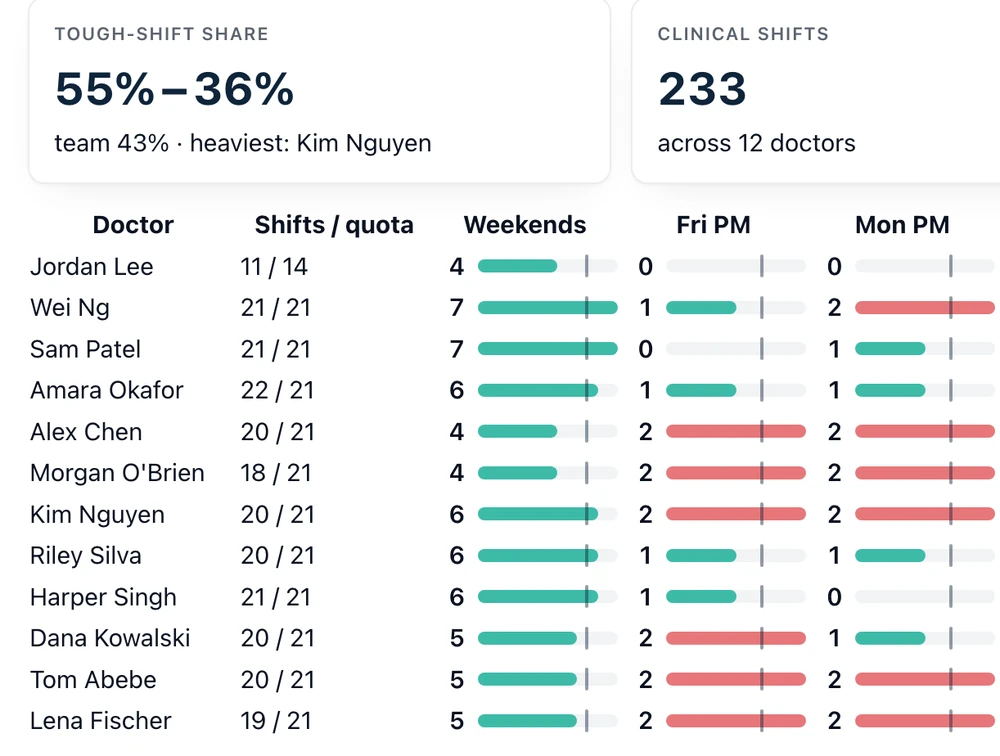
Every zone and every day at once, with the days that still need cover flagged. The Fairness view shows who carried the weekends and the late shifts — the same table for everyone.

A code by text or email, no password. No patient data. Data stays in Sydney. Every change is logged.
Built in an ED, for EDs.
Most department rosters still live in a 56-column spreadsheet that one person can edit. Myrosta puts the whole thing on every phone, with the fairness rules built in. It was built by an emergency physician who ran his own department's roster.
Real roster, real numbers
Questions, answered.
Is it fair?
Everyone books against the same open slots with the same rules: a share per cycle, fortnight caps, optional safe-hours rules and cover minimums. The Fairness tab shows who carried the tough shifts.
Does it work for nurses, junior doctors and clerks?
Clerks and any group on day and evening shifts, yes: each staff group has its own roster, its own zones and its own wording, under one hospital. Rostered night shifts are next to build, so 24-hour nursing and junior-doctor rosters wait for that.
Where is the data?
In a database hosted in Sydney. Sign-in is a one-time code by text or email; the services that deliver the codes are listed in the privacy policy. Every change is logged with who made it.
Does it talk to payroll?
It exports the roster and a one-row-per-shift payroll file in your template's columns, including for RosterOn.
What does it cost?
Early departments join on pilot terms while pricing settles. Book a walkthrough and ask.